TL;DR:
- Hangul typing involves inputting Korean characters by pressing consonant and vowel keys that are automatically assembled into syllable blocks. Mastering the 2-set keyboard layout and practicing the consonant-vowel-consonant sequence enhances typing speed and accuracy. Using online tools, device input settings, and regular practice helps beginners learn Hangul typing efficiently.
Hangul typing is the process of inputting Korean characters by combining consonants and vowels on a standard keyboard to form syllable blocks. The Korean writing system, Hangul, consists of 14 consonants and 10 vowels that pair together into compact, readable units. Unlike typing in English, where each key produces one letter, Hangul typing builds characters in real time as you press key sequences. Mastering this skill accelerates your overall Korean language learning because reading, writing, and typing all reinforce each other. Once you understand the logic behind the keyboard layout, the process becomes surprisingly intuitive.
What is Hangul typing and how does the Korean keyboard layout work?
Hangul is recognized as one of the most logical writing systems ever created. Its design is intentional: each character represents a sound, and those sounds combine into syllable blocks that mirror spoken Korean. That structure makes the keyboard layout equally logical once you learn it.
The 2-set keyboard layout
The standard layout for Korean typing is the 2-set layout, known in Korean as 두벌식. This layout places consonants on the left side of the keyboard and vowels on the right. The grouping mirrors how syllable blocks are built: you type a consonant, then a vowel, and the software automatically assembles them into a single character on screen.

Here is how the key positions map to Hangul characters in the 2-set layout:
| English Key | Hangul Character | Type |
|---|---|---|
| r | ㄱ (g/k) | Consonant |
| s | ㄴ (n) | Consonant |
| e | ㄷ (d/t) | Consonant |
| f | ㄹ (r/l) | Consonant |
| k | ㅏ (a) | Vowel |
| o | ㅗ (o) | Vowel |
| j | ㅓ (eo) | Vowel |
| i | ㅣ (i) | Vowel |
The 3-set layout exists as an alternative and is preferred by some professional typists for speed. For beginners, the 2-set layout is the clear starting point because it is the default on most devices and the most widely taught.
How syllable blocks form automatically
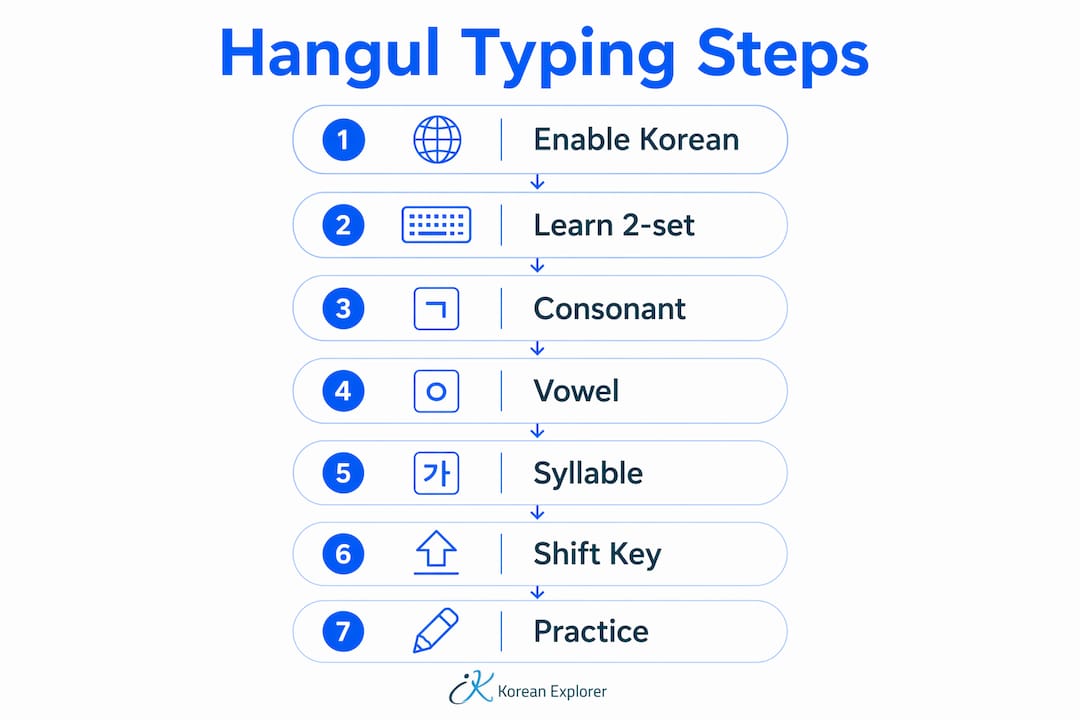
Korean input software handles syllable composition for you. When you press a consonant key followed by a vowel key, the software groups them into one syllable block instantly. If you add a final consonant, it attaches to the bottom of that block. This automatic assembly is what makes Hangul typing feel different from English typing. You are not placing letters side by side. You are building stacked units, and the software does the stacking.
What tools and resources do you need to start typing Hangul?
You do not need a physical Korean keyboard to start practicing. Many online tools provide on-screen keyboards and Romanized input that converts phonetic English keystrokes to Hangul blocks automatically, with no account or installation required. That makes them ideal for beginners who want to practice immediately.
Setting up Korean input on your device
Every major operating system supports Korean input natively. On Windows, go to Settings, then Time and Language, then Language, and add Korean. On macOS, open System Settings, then Keyboard, then Input Sources, and add Korean. Once added, you can switch between English and Korean input with a keyboard shortcut, typically Alt+Shift on Windows or the Globe key on Mac.
Online tools worth using
- On-screen virtual keyboards: Browser-based tools let you click Hangul characters directly. They are useful for learning key positions before committing them to memory.
- Romanized input converters: These tools accept phonetic English input and output Hangul. Type “ga” and get 가. They lower the barrier for absolute beginners.
- Interactive typing practice sites: Some platforms offer real-word practice exercises with instant feedback, which builds accuracy faster than random key strikes.
- Mobile keyboard apps: Both iOS and Android support Korean keyboard installation through system settings. Practicing on your phone during short breaks adds up quickly.
Pro Tip: Print a 2-set keyboard layout map and tape it above your desk for the first two weeks. Glancing at it while typing is faster than stopping to search online every time you forget a key.
For learners who want structured guidance alongside tool-based practice, Korean Explorer’s resource on learning Hangul effectively pairs well with independent keyboard practice.
How do you type Hangul step by step?
Typing Hangul follows a consistent three-part sequence for every syllable: initial consonant, medial vowel, and optional final consonant. Getting this sequence right is the single most important skill to develop early.
Step-by-step syllable construction
- Press the initial consonant key. Every Korean syllable starts with a consonant. Even syllables that sound like they begin with a vowel use the placeholder consonant ㅇ (typed with the “d” key in the 2-set layout).
- Press the vowel key. The software immediately combines the consonant and vowel into a syllable block. For example, pressing “r” (ㄱ) then “k” (ㅏ) produces 가.
- Add a final consonant if needed. Press a consonant key after the vowel to attach it to the bottom of the syllable block. Pressing “r” + “k” + “s” produces 각.
- Move to the next syllable. Simply press the next consonant key. The software closes the current syllable and starts a new one automatically.
- Press the spacebar between words. Korean uses spaces between words, just like English. Spacing errors are one of the most common beginner mistakes.
Using the Shift key for tense consonants and compound vowels
The Shift key unlocks characters that do not appear on the standard key layout. Shift key usage produces tense consonants such as ㅃ, ㅉ, ㄸ, ㄲ, and ㅆ, as well as compound vowels like ㅒ and ㅖ. Without using Shift correctly, you cannot type a significant portion of the Korean vocabulary. Tense consonants change word meaning entirely, so skipping them is not an option.
Here are the key Shift combinations in the 2-set layout:
- Shift + r = ㄲ (tense g/k)
- Shift + e = ㄸ (tense d/t)
- Shift + q = ㅃ (tense b/p)
- Shift + w = ㅉ (tense j)
- Shift + t = ㅆ (tense s)
Pro Tip: Practice tense consonants in isolation before using them in words. Type ㄲ, ㄸ, ㅃ, ㅉ, and ㅆ repeatedly until your left pinky reaches for Shift without hesitation.
Common beginner errors to avoid
The most frequent mistake is pressing keys out of sequence. If you type a vowel before a consonant, the software cannot build a proper syllable block and produces a stray character instead. The second most common error is forgetting the placeholder consonant ㅇ for vowel-initial syllables. Words like 아 (ah) and 이 (this) both require ㅇ as the first keystroke. Missing it produces garbled output that looks nothing like the intended word.
What are common challenges and how do you improve your Hangul typing speed?
Speed and accuracy in Korean typing come from muscle memory, not memorization. Consistent daily practice builds the muscle memory that reduces errors and increases speed over time. Sporadic practice sessions produce much slower progress.
Challenges most learners face
- Forgetting key positions: The 2-set layout shares no visual similarity with the English QWERTY layout. Learners must build a completely new mental map.
- Mixing up similar-looking consonants: Characters like ㄱ and ㄴ look different on paper but feel interchangeable to new typists under pressure.
- Incorrect spacing: Korean spacing rules differ from English in subtle ways. Typing words run together or over-spaced changes meaning and readability.
- Slow Shift key response: Tense consonants require a two-key press. Beginners often miss the timing and produce the wrong character.
How to build speed and accuracy
Practice with real Korean words and phrases, not random key sequences. Typing 한국어 (Korean language) ten times builds more useful muscle memory than pressing random consonants for the same duration.
The most effective method is spaced practice with real words. Short, focused sessions of 10–15 minutes daily outperform one long weekly session. Use interactive tools that show you the correct Hangul output immediately after each keystroke. That instant feedback loop catches errors before they become habits.
Typing out vocabulary you are already studying is another high-return method. If you are learning Korean conversational phrases, type those exact phrases during practice. You reinforce vocabulary and keyboard skills at the same time. For learners who want structured vocabulary to practice with, Korean Explorer’s guide on learning Korean faster provides a solid word bank to work from.
Track your progress weekly. Note which characters you consistently mistype and drill those specific keys. Targeted practice on weak spots produces faster improvement than repeating what you already know.
Key Takeaways
Mastering Hangul typing requires learning the 2-set keyboard layout, practicing the consonant-vowel-consonant sequence daily, and using the Shift key correctly for tense consonants and compound vowels.
| Point | Details |
|---|---|
| Learn the 2-set layout first | Consonants sit on the left, vowels on the right — this structure mirrors how syllable blocks are built. |
| Follow the three-part sequence | Type initial consonant, then vowel, then optional final consonant to form each syllable correctly. |
| Master the Shift key | Tense consonants and compound vowels require Shift; skipping them produces wrong characters and wrong meanings. |
| Practice with real words daily | Short daily sessions using actual Korean vocabulary build muscle memory faster than random key drills. |
| Use free online tools to start | Browser-based keyboards and Romanized input converters require no installation and work on any device. |
What I have learned from years of watching learners tackle Hangul typing
Most learners approach Hangul typing the same way they approached learning English on a keyboard: they look at the keys, hunt for the right one, and press it slowly. That method works for English because the letters are printed on the keys. It fails for Korean because your keyboard almost certainly shows English letters, not Hangul characters.
The learners who progress fastest are the ones who stop looking at the keyboard within the first week. They print a layout map, study it for five minutes before each session, then type without looking down. It feels uncomfortable at first. It produces faster results than any other approach I have seen.
The second thing I would tell every beginner: do not wait until you feel “ready” to type real words. Type your name in Korean on day one. Type the words from your last lesson. Type the lyrics of a Korean song you like. The emotional connection to real content keeps you practicing when the novelty wears off.
Hangul typing is not a separate skill from Korean language learning. It is part of the same process. Every time you type a word correctly, you reinforce its spelling, its sound, and its meaning simultaneously. Treat your keyboard as a learning tool, not just an output device.
— Paul
Korean Explorer: structured Korean learning in Singapore
Typing Hangul is one piece of a larger skill set. Reading, speaking, listening, and writing all develop together when you learn Korean in a structured environment.
Korean Explorer offers adult Korean courses in Singapore covering conversational and business Korean, with flexible options including group classes, private lessons, and online Zoom sessions. The curriculum is built on a framework developed by Seoul National University, which means the vocabulary and grammar you practice typing are the same structures used in real Korean communication. Corporate training programs are also available for teams. Whether you are a hobbyist building a new skill or a professional preparing for work in Korea, Korean Explorer’s Korean language courses give your typing practice a meaningful context to grow in. Classes are held at the Tanjong Pagar center at 10 Anson Road, Level 22, International Plaza, Singapore 079903, as well as at Jurong and Tampines locations.
FAQ
What is Hangul typing?
Hangul typing is the process of inputting Korean characters by pressing consonant and vowel keys in sequence on a keyboard. The input software automatically assembles those keystrokes into syllable blocks.
What is the best keyboard layout for typing Korean?
The 2-set layout is the standard and most widely used layout for Korean typing. It places consonants on the left side of the keyboard and vowels on the right, making syllable construction straightforward for beginners.
Do I need a special keyboard to type in Hangul?
No special keyboard is required. You can enable Korean input through your operating system settings on any standard keyboard, or use free browser-based tools that display an on-screen Korean keyboard.
How long does it take to get comfortable with Hangul typing?
Most learners recognize key positions within one to two weeks of daily practice. Comfortable typing speed with real words typically develops within four to six weeks of consistent short sessions.
Why does my Hangul typing produce the wrong characters?
The most common cause is an incorrect key sequence, such as typing a vowel before a consonant. Missing the placeholder consonant ㅇ for vowel-initial syllables and forgetting Shift for tense consonants are also frequent sources of errors.