The fastest way to fix your Korean pronunciation is pairing an app that gives phoneme-level feedback with a short daily practice routine, not just downloading more vocabulary apps. If you only remember one thing from this article, remember that: apps like PixelSpeech score you at the sound level using Azure AI speech recognition, Pronounce Korean gives instant feedback and tracks the words that trip you up, and Korean by Nemo’s Speech Studio lets you record yourself and compare directly against native-speaker audio.
Here’s the shortlist, matched to what you’re actually trying to fix:
- Best for phoneme drills: PixelSpeech, thanks to its AI pattern diagnosis that flags recurring weak spots like final consonants or tense versus aspirated sounds.
- Best for conversation shadowing: Mondly, which uses scripted native-speaker dialogues and only rewards clear speech.
- Best for Hangul mouth-shape work: SNU LEI’s Hangeul app, built around video of native speakers’ mouth shapes tied to stroke order.
- Best free option: Naver Papago, useful for quick pronunciation checks on the go even though it wasn’t built as a dedicated trainer.
- Best for word-level habit building: Pronounce Korean, for learners who want instant feedback on individual words they keep mispronouncing.
Key Takeaways
The fastest path to clear Korean pronunciation combines a phoneme-scoring app for daily drills, a shadowing app for natural rhythm, and periodic live correction for the errors no algorithm catches.
| Point | Details |
|---|---|
| Best for phoneme drills | PixelSpeech’s Azure AI scoring and pattern diagnosis pinpoint recurring sound errors like weak final consonants. |
| Best for shadowing practice | Mondly’s native-speaker dialogues and speech recognition reward clear, natural conversational speech. |
| Best for record-and-compare | Korean by Nemo’s Speech Studio lets you play your own voice against native audio, even offline. |
| Best free starting point | Naver Papago and the Korean Pronunciation Trainer app cost nothing to test before committing further. |
| When apps hit their limit | Persistent errors after weeks of focused drilling usually mean it’s time for live feedback, which Com’s adult conversational classes are built to provide. |
Table of Contents
- What Are the Best Korean Pronunciation Apps Right Now?
- Side-by-Side: How the Top Korean Speaking Apps Compare
- Quick Reviews: What Each Top App Actually Does
- How to Choose the Right Korean Pronunciation App for Your Goals
- How Do I Use These Apps to Actually Improve My Pronunciation?
- What Pronunciation Apps Can’t Fix (and When You Need a Teacher)
- How We Use Apps Alongside Adult Classes
- Ready to Fix What Your App Can’t?
- Sourced Apps and Reference Links
- Sources
- FAQ
What Are the Best Korean Pronunciation Apps Right Now?
Nine names come up again and again when you search for a Korean pronunciation app that actually gives useful feedback: Pronounce Korean, Korean by Nemo, Naver Papago, Forvo, koreanpronunciation.com’s Korean Pronunciation Checker, PixelSpeech, the Korean Pronunciation Trainer on Google Play, and Mondly. Each solves a slightly different problem, and none of them replaces the other seven completely.
The split that matters most is between apps that score your speech and apps that just play native audio for you to compare against. PixelSpeech sits in the first camp. It runs your recording through Azure AI speech assessment and returns a phoneme-level score, then diagnoses recurring patterns like weak final consonants. Pronounce Korean also scores you, but at the word level, and lets you save problem words to a personal list you revisit.

Apps in the second camp, like Forvo and Naver Papago, don’t score you at all. They give you a native pronunciation to imitate and leave the judgment call to your own ear (or a friend’s). That’s not a weakness so much as a different job: Forvo is a crowd-sourced pronunciation dictionary, useful for hearing how a specific word or name actually sounds, not a trainer that grades your attempt.
Korean by Nemo splits the difference with its Speech Studio, where you record yourself and play it back next to native audio for direct comparison, plus offline access so you’re not stuck without a connection on the train. koreanpronunciation.com’s Korean Pronunciation Checker and the free Korean Pronunciation Trainer app round out the field for learners who want a no-frills, browser-based or lightweight Android option before committing to a subscription.
Side-by-Side: How the Top Korean Speaking Apps Compare
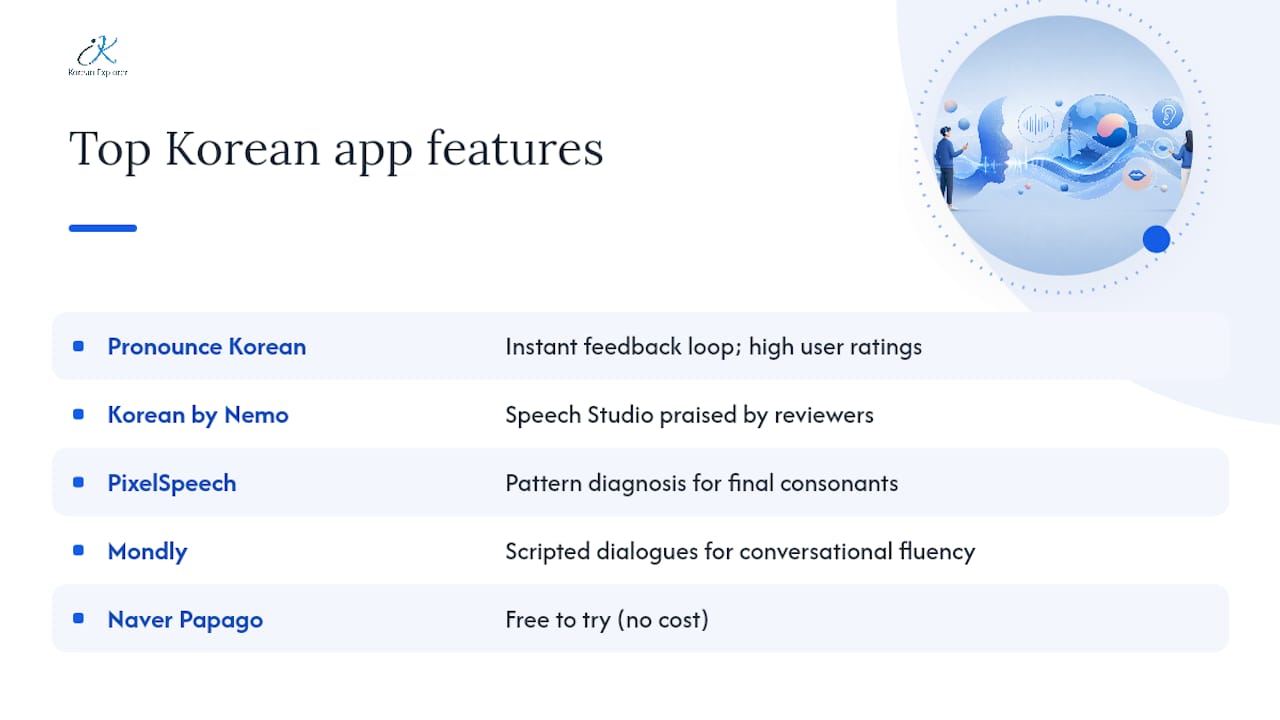
App-store listings back up why Pronounce Korean and Korean by Nemo keep showing up on recommendation lists: Pronounce Korean’s App Store page shows consistently high user ratings tied to its instant feedback loop, and Korean by Nemo’s listing highlights its Speech Studio as the feature reviewers mention most.
If you’re a total beginner, skip the AI scoring apps for your first two weeks and start with something like SNU LEI’s Hangeul app, which ties mouth shapes to letters before you ever try to get graded. If you’re already conversational and want to sound less textbook, Mondly’s scripted dialogues do more for you than a phoneme scorer will. If you’re chasing down one specific weak sound (final consonants are the usual suspect), PixelSpeech’s pattern diagnosis is built exactly for that. And if you just want something free to test the waters, Naver Papago and the Korean Pronunciation Trainer app cost you nothing to try tonight.
Quick Reviews: What Each Top App Actually Does
Pronounce Korean gives you instant pronunciation feedback the moment you record a word, then lets you save the ones you keep getting wrong into a personal review list. It’s iOS-only right now, and it’s built around a “speak out loud daily” habit rather than long lesson modules. The App Store listing shows strong user ratings, which tracks with how simple the core loop is: record, get a score, save, repeat.
Korean by Nemo centers on its Speech Studio, where you record your own voice and play it back directly against a native speaker’s clip for the same word or phrase. Offline audio access means you can drill on a flight or the subway without burning data, and it tracks your progress across sessions so you can see which sounds are actually improving. It works on both iOS and Android, with a freemium structure that unlocks more content over time.
PixelSpeech is the closest thing on this list to a lab-grade pronunciation coach. It runs your voice through Azure AI speech assessment, returns a phoneme-level score, and then diagnoses recurring error patterns, things like consistently softening a tense consonant or dropping a final consonant sound. Mini-games keep the drilling from feeling like a chore, though it’s Android-only for now.
Mondly leans into full conversational dialogues rather than isolated words, using native-speaker audio and a speech-recognition system that reportedly only gives positive feedback when you actually speak clearly enough to be understood. That makes it a better fit for shadowing practice than for isolating a single stubborn phoneme.
Naver Papago wasn’t designed as a pronunciation trainer, but its translation and text-to-speech features make it a fast, free way to hear how a word or phrase should sound before you attempt it yourself. Think of it as a pocket reference, not a coach.
- Pro tip for Pronounce Korean: Save every flagged word immediately, then run a five-minute review of just that saved list before bed. Recall right before sleep tends to stick better than cramming a fresh list.
- Pro tip for Korean by Nemo: Record the same sentence three times in a row and only move on once take three sounds noticeably closer to the native clip than take one.
- Pro tip for PixelSpeech: Ignore the overall score for your first week and only look at the phoneme breakdown. The single-number score hides exactly which sound is dragging your average down.
- Pro tip for Mondly: Mute your own voice in your head while shadowing. Trying to match the native audio’s rhythm, not just the words, is what actually improves your intonation.
- Pro tip for Naver Papago: Use the camera translation feature on signage or menus, then say the Korean out loud before checking the audio playback. Guessing first builds the recall Papago alone won’t.
How to Choose the Right Korean Pronunciation App for Your Goals
Not every app deserves a spot on your phone. Run each candidate through this checklist before you commit:
- Feedback specificity. Does it score individual sounds, or just tell you “good job” for the whole word? Phoneme-level tools like PixelSpeech catch errors that word-level apps miss entirely.
- Native audio quality. Is the reference audio recorded by an actual native speaker, or synthesized text-to-speech? Synthesized voices can teach you subtly wrong rhythm.
- Offline support. If you commute without reliable data, an app like Korean by Nemo that works offline will actually get used; one that requires constant connectivity often won’t.
- Price model. Freemium apps are fine for testing, but check whether the free tier gives you enough real practice or just a locked demo.
- Extra practice modes. Mini-games, spaced repetition, and progress tracking (Mondly and PixelSpeech both offer versions of this) keep you coming back after the novelty wears off.
Watch for these red flags before you commit real practice time:
- No recording or feedback loop at all, just audio playback with no way to check your own attempt.
- Audio that sounds robotic or dated, a sign the app hasn’t been updated in a while.
- No progress tracking, so you can’t tell if you’re actually improving week over week.
Pair a phoneme-level scorer (PixelSpeech) with a conversation-focused shadowing app (Mondly) if your goal is speaking fluency. Pair a visual Hangul app (SNU LEI) with a word-level scorer (Pronounce Korean) if you’re still a beginner building the connection between letters and sounds. For deeper strategies on fixing specific sound patterns, our guide on the most common Korean pronunciation mistakes breaks down the errors adult learners hit most often.
How Do I Use These Apps to Actually Improve My Pronunciation?
The single most effective routine combines short daily shadowing, targeted phoneme drills, and a weekly recording review, not marathon study sessions once a week. Fifteen minutes a day beats ninety minutes on Sunday, because pronunciation is a motor skill, and motor skills need frequent repetition to stick.
Here’s a sample 20-minute session that puts that into practice:
- Warm-up (3 minutes): Read five sentences aloud from any app’s dialogue bank, just to get your mouth moving in Korean before drilling anything specific.
- Shadowing (7 minutes): Play a native-speaker clip in Mondly or Korean by Nemo and speak along at the same time, not after. This is shadowing, and it works because your mouth mimics rhythm and intonation in real time instead of trying to reconstruct it from memory a beat later.
- Phoneme drills (5 minutes): Open PixelSpeech and target whatever sound its pattern diagnosis flagged last session. Repeat that specific sound in five different words.
- Record-and-compare (3 minutes): Use Korean by Nemo’s Speech Studio to record a short passage and compare it directly against the native clip.
- Weekly review (2 minutes, once a week): Listen back to a recording from seven days ago and compare it against today’s. Progress that’s invisible day to day is often obvious week to week.
Pro tip: Record yourself saying the same five sentences every Sunday for a month using the same app. A week-over-week comparison shows progress that a single session never will, because daily gains are too small to hear in isolation.
AI feedback on pronunciation works well for catching immediate errors, but its real value shows up when it’s paired with a human who can explain the “why” behind a mistake, not just flag that one exists. That’s especially true for nuances like formal versus casual speech register, which no scoring algorithm currently evaluates. Our post on easy ways to improve pronunciation of Korean phrases covers shadowing technique in more depth if you want to build this into a longer daily habit. For a broader look at how structured pronunciation practice works across languages, Canary’s guide to pronunciation practice is worth a read too.
What Pronunciation Apps Can’t Fix (and When You Need a Teacher)
Apps are excellent at catching a mispronounced consonant. They’re much weaker at catching everything that happens around the sound itself.
- Cultural and register nuances. No app currently tells you that the pronunciation shift between casual speech and formal honorifics carries social weight, not just phonetic differences.
- Honorific speech patterns. The subtle vowel and pitch changes that signal politeness level are almost impossible for current speech-recognition models to grade meaningfully.
- Coarticulation issues. How one sound bleeds into the next in fast, natural speech is something apps rarely test, since most drills use isolated words or short phrases.
- Physiological articulation problems. If your tongue placement or jaw movement is fundamentally off for a specific sound, an app can tell you the output is wrong, but not physically show you how to fix the placement.
You likely need a teacher, not another app, if you’ve drilled the same sound for several weeks with focused app practice and it still slips in actual conversation, or if your phoneme production is inconsistent, correct one moment, wrong the next, with no clear pattern an app can diagnose.
Pro tip: Bring your app’s error log to your next lesson instead of starting from scratch. Handing a teacher a specific list of flagged words gets you targeted correction in minutes rather than spending half the lesson figuring out what’s wrong.
How We Use Apps Alongside Adult Classes
Apps and classroom instruction solve different halves of the same problem. In an adult class setting, the most effective workflow looks like this: students run short app drills before class to warm up on sounds they already know are weak, the instructor diagnoses what’s actually happening physically during the session, and then a recording assignment afterward locks in the correction before it fades.

One pattern shows up often enough to be worth mentioning: a student drills a specific final consonant for weeks on an app, sees the score creep up, but still drops that consonant entirely in fast conversation. An app can tell you the isolated sound is improving. It usually can’t tell you that the same sound disappears the moment you’re speaking at a natural pace, because that’s a coarticulation issue, not a single-sound issue. A native instructor catches that gap in about thirty seconds of live conversation and can adjust the drill to fix it, something no app currently does well.
That’s the gap adult, conversation-focused classes with native instructors are built to close, especially when lessons are recorded so students can rewatch the exact moment a correction happened. Flexible online formats matter here too. A learner who can only practice at odd hours still needs the same live diagnostic step an app can’t provide.
Ready to Fix What Your App Can’t?
The last 20%, the coarticulation, the register shifts, the sounds that vanish in fast conversation, usually needs a human ear that can hear the gap and correct it on the spot.
Com’s adult Korean courses are built around exactly that gap. Classes focus on conversational and business Korean, taught by native instructors who catch the pronunciation issues an app’s score can’t explain, and every session is recorded so you can rewatch the correction as many times as an app drill. Private online lessons over Zoom mean you can bring your app’s flagged word list straight into a session, whether you’re fixing a habit before a client call or just want to sound less textbook in everyday conversation. Corporate training is available too, for teams who need conversational Korean for work rather than travel. If a specific sound has stalled on every app you’ve tried, check available Korean language courses, and book a lesson that targets exactly what’s stuck.
Sourced Apps and Reference Links
- Pronounce Korean App, App Store listing showing instant feedback features and user ratings.
- Korean by Nemo, App Store listing detailing the Speech Studio and offline audio.
- PixelSpeech – Korean Pron AI, Google Play listing covering Azure AI scoring and phoneme feedback.
- Learn Korean. Speak Korean (Mondly), Google Play listing describing native-speaker dialogues and speech recognition.
- SNU LEI – Hangeul, Google Play listing covering mouth-shape videos and stroke-order practice.
- Write It! Korean, App Store listing for handwriting-recognition Hangul practice.
- Forvo, community pronunciation dictionary for hearing native audio on specific words.
Sources
- PixelSpeech – Korean Pron AI – Apps on Google Play
- Pronounce Korean App – App Store
- Korean by Nemo
- Write It! Korean App – App Store
FAQ
What Is the Best Korean Speaking App?
There’s no single best app for every goal: PixelSpeech leads for phoneme-level scoring, Mondly leads for conversational shadowing, and Korean by Nemo leads for record-and-compare practice against native audio.
How Do I Improve My Korean Pronunciation?
Combine short daily shadowing practice with targeted phoneme drills on an app like PixelSpeech, then review a recording of yourself weekly to track real progress. Add periodic feedback from a native instructor to catch errors apps miss, like register shifts and coarticulation.
What Is the Best App for Improving Pronunciation in General?
For Korean specifically, apps that offer phoneme-level AI scoring, like PixelSpeech, or direct native-audio comparison, like Korean by Nemo’s Speech Studio, tend to outperform generic translation apps for actual pronunciation correction.
Is Migii TOPIK Worth It?
Migii TOPIK focuses on exam-style vocabulary and grammar practice rather than phoneme-level pronunciation feedback, so it’s not built to solve the specific pronunciation problems this article covers.
When Should I See a Teacher Instead of Just Using Apps?
If a specific sound stays wrong after several weeks of focused app practice, or your pronunciation is inconsistent in real conversation despite good app scores, that’s the signal to bring in live instruction, which Com’s adult conversational classes provide alongside recorded lessons for review.